
Inspiration into Ride
There is a funny thing about motorcycle riding and apps that help you plan rides.
You’re expectation is most like expecting RidePlan to be like the others, a SatNav first app. They try to offer inspiration, but they do it by giving you an empty map, usually centred on your house, while you are sat on the sofa trying to think of somewhere decent to go.
That is already a problem.
Some apps offer auto-route generation which sounds good in theory. In practice, at least my experience, they tend to bounce between trunk roads or tiny farm lanes. You end up riding around the good bits rather than through them.
This is not perfect thinking yet, but it is where RidePlan started.
RidePlan is being built to burst the boredom. Not by telling you where to go, but by showing you better options. We are not SatNav-first, and we are not trying to replace it either.
This is not a step-by-step guide. This is about how RidePlan thinks about rides.
Rides | Segments | Tours
Not every ride needs a plan. Not every ride needs planning. Sometimes you just want to get out and ride.
When planning is useful, RidePlan covers the basics. Name the ride, describe it, pick a cover if you want to, and start building. It is all shaped by real-world riding problems rather than feature checklists.
If a group chat helps keep everyone aligned, add one. If it doesn’t, ignore it. The aim is to reduce faff, not add more.
Segments
Every decent ride has sections of road everyone remembers.
The stretch you would happily go out of your way for. The road with the view that makes you slow down. The bit that reminds you why riding a motorcycle is different.
In RidePlan, these are called Segments.
Segments are sections of road that are worth traveling for, either because of the road itself, the views or whole package that area offers.
Make it stand out
Whatever it is, the way you tell your story online can make all the difference.
The inspiration layer
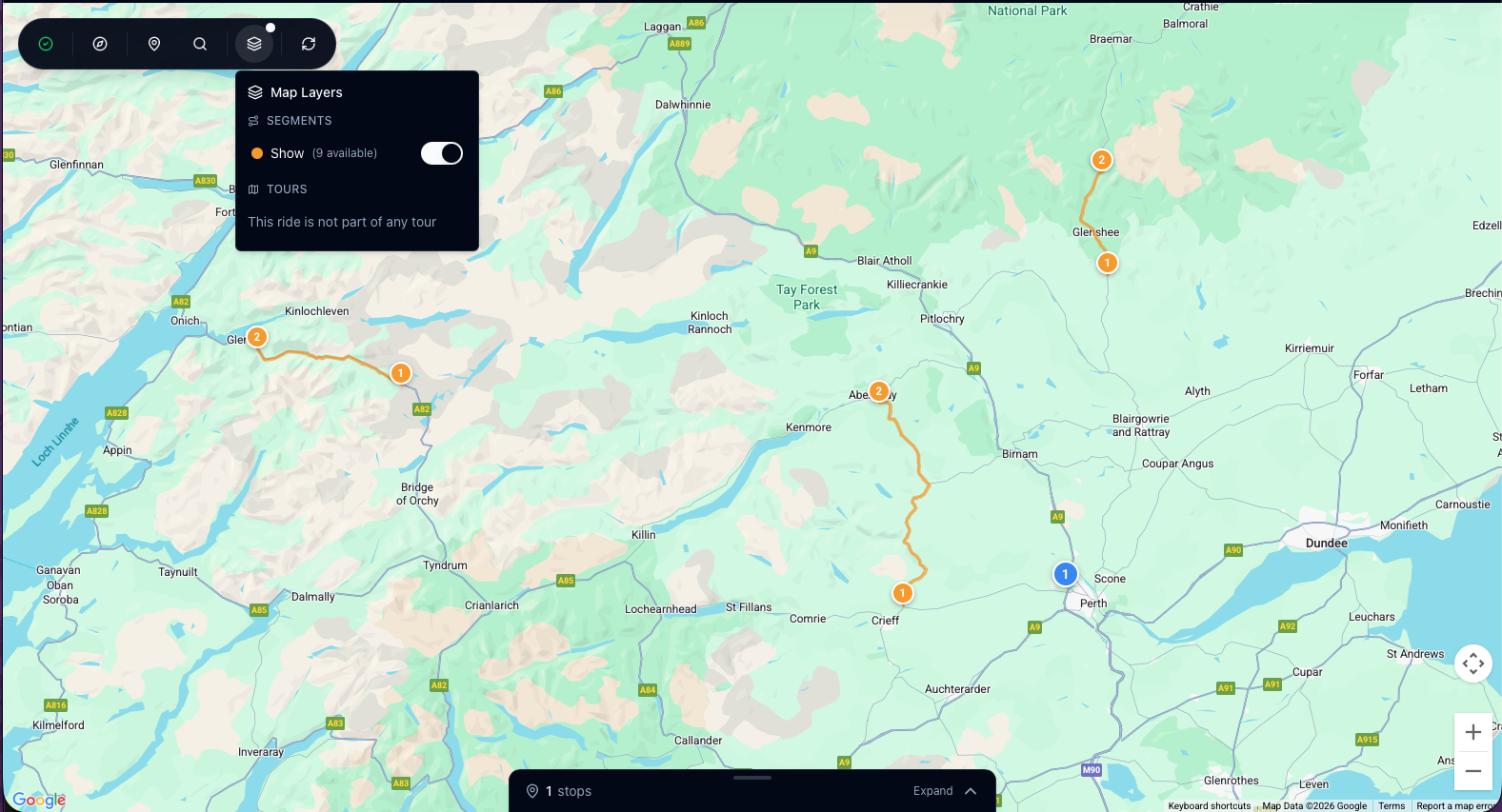
In the Route Editor, you can turn on the Segments layer. (See below)
Instead of starting with a blank map, you start with highlighted sections of road across the UK that riders already travel for. Roads that reward you, whether that is the riding, the view, or the atmosphere of the place.
Each yellow line is a Segment.
This is called the inspiration layer because that is what it is meant to be. It is not telling you what to do. It is giving you options you might not have considered.
A real-world example
Say you are visiting Scotland, or you live there already. It is Thursday night and you are thinking about where to go at the weekend.
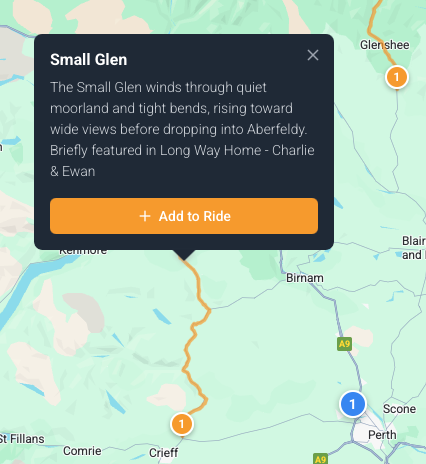
You turn on the Segments layer and a few sections stand out. Click one and you get a name and a short description. Sometimes there is a bit of context too. This one featured briefly in Long Way Home as the lads set off.
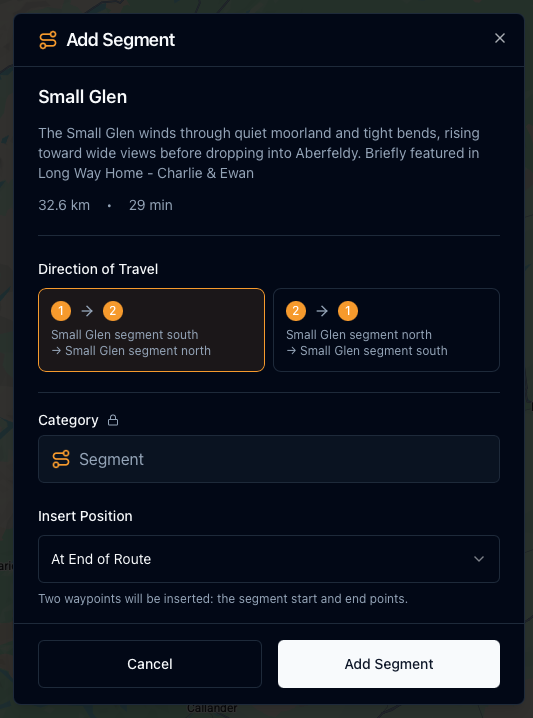
If it fits, you add it to your ride. You choose the direction and where it sits in the route. End, middle, or reshaping something you already had in mind.
From inspiration to ride
Segments are not rides by themselves. They are building blocks.
Relatively quickly you go from a map of ideas to an afternoon ride or a full day out. Not by chasing the shortest route, but by deliberately choosing better roads.
That is the thinking behind RidePlan Segments.